
Your team already uses Microsoft Teams for chat and meetings. Click2Call adds one missing piece — the ability to call any phone number in Australia and receive calls on your business number, all from inside Teams. No new apps, no new hardware, no Microsoft Domestic Calling Plan required.
Key Takeaways
Microsoft Teams is great for chatting with your team, sharing files, and jumping on a video call. But out of the box it can’t do one thing — call a regular phone number. You can’t ring a customer’s mobile, call a supplier, or receive a call from someone dialling your business number.
Click2Call fixes that. We connect your Teams account to the real phone network so your team can call and receive calls from any number in Australia — directly inside the Teams app they already use every day. Nothing changes for them except a dial pad appears.
Three things connect together. That’s it.
Your team keeps using Teams exactly as they do now. A dial pad appears and they can make and receive calls like a normal phone.
We link your Teams account to our Australian phone network. This is the bridge that lets Teams talk to real phone numbers.
Once connected, your team can call any landline or mobile in Australia — and customers can call your business number and reach them in Teams.
This approach — called Direct Routing — is Microsoft-approved. It replaces Microsoft's Domestic Calling Plan (which isn't available at an affordable price in Australia) with a local provider like Click2Call.
Most Teams calling providers give you a SIP trunk and a number. Click2Call gives you a full Cloud PBX — with Microsoft Teams as the interface. That means every Teams user gets the complete Click2Call feature set included at no extra cost.
AI Call Transcription
Every call is automatically transcribed. Search, review, and share transcripts from the portal.
AI Call Summaries
After each call, an AI-generated summary captures the key points — no manual note-taking required.
Sentiment Analysis
Understand caller tone across every conversation. Flag calls that need follow-up attention.
Call Recording
Automatic call recording stored securely in your Click2Call portal. Accessible anytime.
Cloud PBX Voicemail
Voicemail delivered to your email inbox with a transcript. Never miss a message.
Auto-Attendant / IVR
Greet callers professionally and route them to the right person or team automatically.
Call Queues
Queue inbound calls and distribute them across your team. No caller left hanging.
Australian & NZ Data Residency
All recordings, transcripts, and call data stored on infrastructure in Australia and New Zealand.
Teams Dial Pad
Call any Australian landline or mobile directly from the Teams app — desktop or mobile.
Inbound Calls to Teams
Your Australian business number rings directly inside Teams. No separate app needed.
Teams Chat & Meetings
Internal messaging and video meetings work exactly as they do today — nothing changes.
Mobile & Desktop App
Make and receive calls on any device — Windows, Mac, iOS, or Android.
No New Hardware Required
Works on the computers and phones your team already uses. No desk phones needed.
Note: Teams features require a Microsoft 365 Business plan with the Teams Phone System Licence add-on ($12.10/user/month, paid directly to Microsoft). Click2Call does not charge for this.
All Click2Call Cloud PBX features are included with every Teams User plan at $25.00/user/month. No add-ons required for core features. Learn more about AI Voice Tools.
There are three things you need to make calls from Teams. Two are paid to Microsoft, one is paid to Click2Call. Here is exactly what each one does and what it costs.
Before you start: You need a Microsoft 365 Business plan that includes Microsoft Teams (for example, Microsoft 365 Business Basic, Standard, or Premium). A personal Microsoft 365 subscription will not work — Teams calling requires a business plan. If your team already uses Teams for chat and meetings, you almost certainly have this already.
This is the licence that unlocks the dial pad inside Teams. Without it, Teams has no phone functionality at all — you can chat and video call your colleagues, but you cannot call a real phone number. It does not include an Australian number or local calling — that is what Click2Call provides.
Included in Microsoft 365 E5, or available as an add-on to any Microsoft 365 Business plan. Paid directly to Microsoft.
This gives you an Australian phone number and connects it to Teams via Direct Routing. It includes 300 minutes of outbound calling and unlimited inbound calling. Microsoft does not offer local Australian numbers or affordable local calling in Australia — Click2Call provides both.
Paid to Click2Call. Includes your Australian number, 300 outbound minutes, and unlimited inbound calls.
| Cost Component (per user/month) | Paid to | Amount |
|---|---|---|
| Microsoft 365 Business Plan (must include Teams — Business Basic, Standard, or Premium) | Microsoft | Varies by plan |
| Microsoft Teams Phone System Licence (required to enable the dial pad in Teams) | Microsoft | $12.10/month |
| Microsoft Teams User (Australian number + 300 outbound mins + unlimited inbound) | Click2Call | $25.00/month (ex GST) |
| Estimated Fixed Monthly Cost (per user, excl. M365 plan) | From $37.10/month (ex GST) |
Microsoft pricing sourced from microsoft.com, February 2026. Subject to change. The Microsoft Teams Phone System Licence is paid directly to Microsoft — Click2Call does not charge for this. Click2Call charges $25.00/month per user for the Microsoft Teams User plan, which includes 300 outbound minutes and unlimited inbound calls. Microsoft does not currently offer local Australian numbers or local calling in Australia.
No contracts. No lock-in. Cancel anytime.
Click2Call operates on a prepaid credit model — there is no minimum monthly spend, no lock-in contract, and no cancellation fee. Add credit when you need it and cancel at any time.
Your data stays in Australia and New Zealand.
All call recordings, transcripts, AI-generated outputs, and account data are stored on infrastructure located in Australia and New Zealand. Click2Call does not use offshore servers. Full details are in our Terms and Conditions.
Start your free 7-day trial — no credit card required. Set it up yourself in 30 minutes, or let us handle everything for a one-time $50/user fee.
The setup involves three simple steps and takes about 30 minutes if you have Microsoft Teams Admin access. Prefer to hand it over? We'll handle everything for a one-time fee.
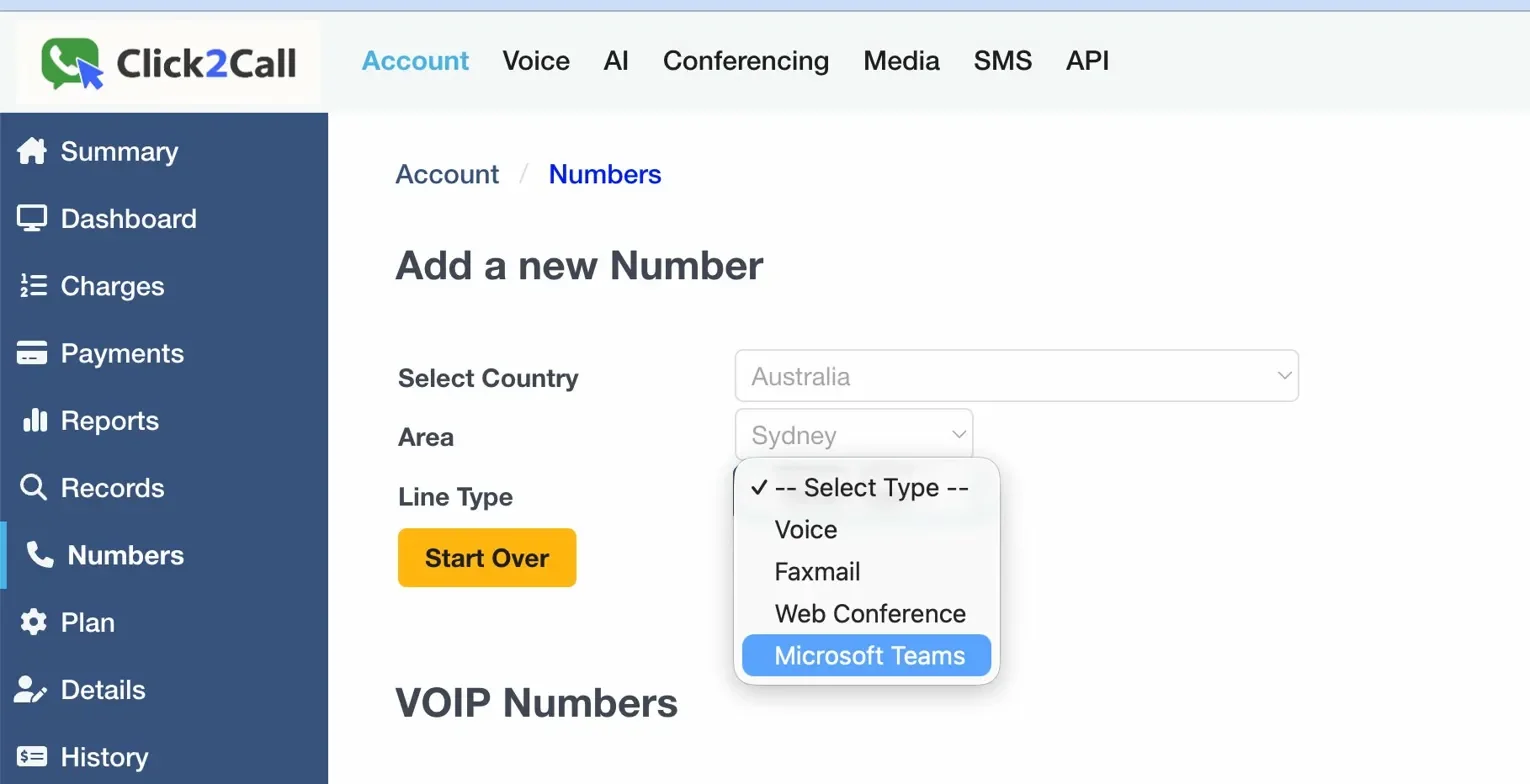
In the Click2Call portal go to Account → Numbers, add a new number and select “Microsoft Teams” as the line type. One number is needed per Teams user.
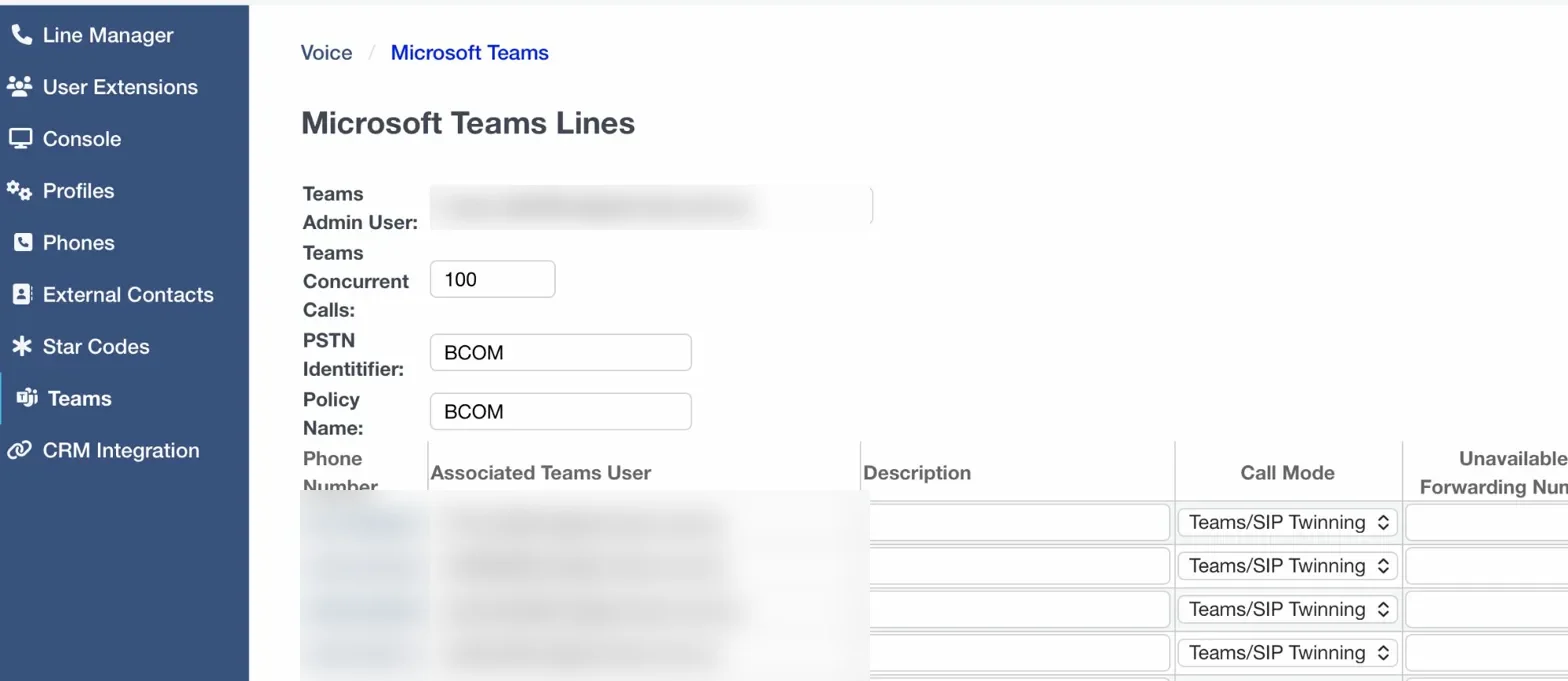
In Voice → Teams, enter each person’s Microsoft 365 email address next to their phone number. The portal generates the PowerShell commands for you automatically.
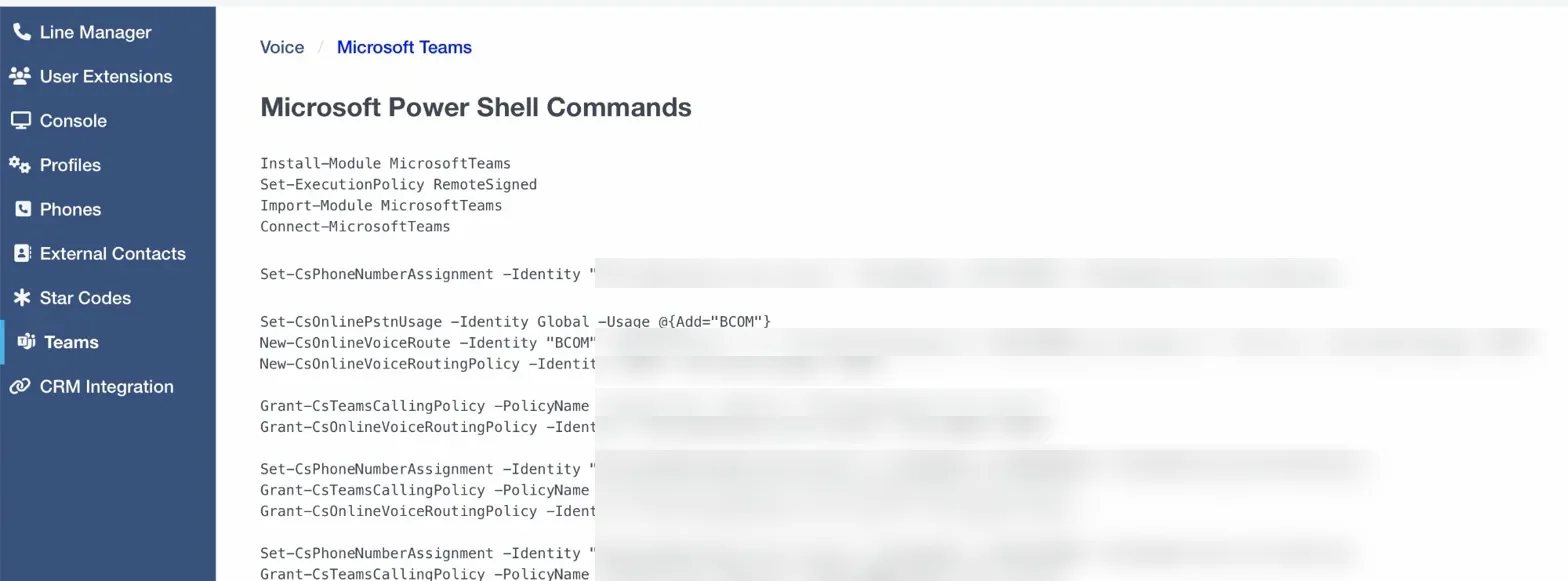
Copy and run the generated PowerShell commands in Microsoft Teams Admin. The dial pad appears in Teams within a few minutes.
Free no setup fee
$50.00 per user (ex GST) — one-time fee
Both options use the same Click2Call portal and Australian phone network. The managed setup is a one-time fee — no ongoing managed service charges.
Direct Routing is the way Click2Call connects your Microsoft Teams to real phone numbers. It’s a Microsoft-approved method that lets your team call any landline or mobile in Australia — and receive calls on your business number — all from inside Teams.
Yes. Each Teams user needs a Microsoft 365 licence that includes the Phone System add-on. Click2Call provides the phone number and the connection to the phone network. Microsoft provides the software side. Contact us if you’re not sure which licence you have — we can check.
Microsoft Calling Plans are Microsoft's own calling service, which can be expensive and are not always available in all Australian regions. Direct Routing uses a third-party provider like Click2Call to supply the calling capability, which is typically 40–60% cheaper than Microsoft Calling Plans and offers more flexibility, including Australian local numbers and 1300 numbers.
Yes. Click2Call supports full number porting, so you can transfer your existing Australian landline or 1300 numbers to our platform and use them with Microsoft Teams. The porting process typically takes 5–10 business days and is managed by our team.
No additional hardware is required. Your team can make and receive calls directly from the Microsoft Teams desktop app, mobile app, or a Teams-certified desk phone. If you prefer physical handsets, we can supply compatible Teams-certified IP phones.
Yes. Click2Call's Microsoft Teams Direct Routing service is available to any Australian business with a stable internet connection, regardless of location. We provide Australian local numbers for all major cities and regions, as well as 1300 and 1800 numbers.
If you set it up yourself using our portal, it usually takes about 30 minutes once you have your number. If you choose our managed setup service ($50 per user, one-time), we handle everything and have you running within 1–2 business days.
Microsoft Teams requires approximately 100 kbps per concurrent call. A standard NBN connection is more than sufficient for most businesses. We recommend a connection with low jitter and latency for the best call quality. Our team can advise on network requirements during the setup process.
Yes. Click2Call offers a 7-day free trial for all services, including Microsoft Teams Direct Routing. Your account is loaded with $11 credit and 10 test calls — no credit card required. Sign up at portal.click2call.com.au/join and our team will assist with the initial configuration.
In the event of a Microsoft Teams service disruption, Click2Call can configure call failover to redirect incoming calls to a mobile number, alternative number, or voicemail. This ensures your business remains reachable even during platform outages.
Have more questions? View all FAQs for answers to common questions about our services.
Sign up free, add a Teams number in the portal, and have your team making calls in Teams by end of day.
Get Started